Tweak a brush specification
Usage
tweak_brush(
  brush,
  normalize = "all",
  opaque,
  opaque_multiply,
  opaque_linearize,
  radius_logarithmic,
  hardness,
  anti_aliasing,
  dabs_per_basic_radius,
  dabs_per_actual_radius,
  dabs_per_second,
  radius_by_random,
  speed1_slowness,
  speed2_slowness,
  speed1_gamma,
  speed2_gamma,
  offset_by_random,
  offset_by_speed,
  offset_by_speed_slowness,
  slow_tracking,
  slow_tracking_per_dab,
  tracking_noise,
  color_h,
  color_s,
  color_v,
  restore_color,
  change_color_h,
  change_color_l,
  change_color_hsl_s,
  change_color_v,
  change_color_hsv_s,
  smudge,
  smudge_length,
  smudge_radius_log,
  eraser,
  stroke_threshold,
  stroke_duration_logarithmic,
  stroke_holdtime,
  custom_input,
  custom_input_slowness,
  elliptical_dab_ratio,
  elliptical_dab_angle,
  direction_filter,
  lock_alpha,
  colorize,
  snap_to_pixel,
  pressure_gain_log,
  gridmap_scale,
  gridmap_scale_x,
  gridmap_scale_y,
  smudge_length_log,
  smudge_bucket,
  smudge_transparency,
  offset_y,
  offset_x,
  offset_angle,
  offset_angle_asc,
  offset_angle_view,
  offset_angle_2,
  offset_angle_2_asc,
  offset_angle_2_view,
  offset_angle_adj,
  offset_multiplier,
  posterize,
  posterize_num,
  paint_mode
)
Arguments
- brush
Installed brush name,
.mybfile path, JSON brush string, or anothertweak_brush()object.- normalize
One of
"all","size","tracking", or"none".- opaque
0 means brush is transparent, 1 fully visible (also known as alpha or opacity)
- opaque_multiply
This gets multiplied with opaque. You should only change the pressure input of this setting. Use 'opaque' instead to make opacity depend on speed. This setting is responsible to stop painting when there is zero pressure. This is just a convention, the behaviour is identical to 'opaque'.
- opaque_linearize
Correct the nonlinearity introduced by blending multiple dabs on top of each other. This correction should get you a linear ("natural") pressure response when pressure is mapped to opaque_multiply, as it is usually done. 0.9 is good for standard strokes, set it smaller if your brush scatters a lot, or higher if you use dabs_per_second. 0.0 the opaque value above is for the individual dabs 1.0 the opaque value above is for the final brush stroke, assuming each pixel gets (dabs_per_radius*2) brushdabs on average during a stroke
- radius_logarithmic
Basic brush radius (logarithmic) 0.7 means 2 pixels 3.0 means 20 pixels
- hardness
Hard brush-circle borders (setting to zero will draw nothing). To reach the maximum hardness, you need to disable Pixel feather.
- anti_aliasing
This setting decreases the hardness when necessary to prevent a pixel staircase effect (aliasing) by making the dab more blurred. 0.0 disable (for very strong erasers and pixel brushes) 1.0 blur one pixel (good value) 5.0 notable blur, thin strokes will disappear
- dabs_per_basic_radius
How many dabs to draw while the pointer moves a distance of one brush radius (more precise: the base value of the radius)
- dabs_per_actual_radius
Same as above, but the radius actually drawn is used, which can change dynamically
- dabs_per_second
Dabs to draw each second, no matter how far the pointer moves
- radius_by_random
Alter the radius randomly each dab. You can also do this with the by_random input on the radius setting. If you do it here, there are two differences: 1) the opaque value will be corrected such that a big-radius dabs is more transparent 2) it will not change the actual radius seen by dabs_per_actual_radius
- speed1_slowness
How slow the input fine speed is following the real speed 0.0 change immediately as your speed changes (not recommended, but try it)
- speed2_slowness
Same as 'fine speed filter', but note that the range is different
- speed1_gamma
This changes the reaction of the 'fine speed' input to extreme physical speed. You will see the difference best if 'fine speed' is mapped to the radius. -8.0 very fast speed does not increase 'fine speed' much more +8.0 very fast speed increases 'fine speed' a lot For very slow speed the opposite happens.
- speed2_gamma
Same as 'fine speed gamma' for gross speed
- offset_by_random
Add a random offset to the position where each dab is drawn 0.0 disabled 1.0 standard deviation is one basic radius away <0.0 negative values produce no jitter
- offset_by_speed
Change position depending on pointer speed = 0 disable > 0 draw where the pointer moves to < 0 draw where the pointer comes from
- offset_by_speed_slowness
How slow the offset goes back to zero when the cursor stops moving
- slow_tracking
Slowdown pointer tracking speed. 0 disables it, higher values remove more jitter in cursor movements. Useful for drawing smooth, comic-like outlines.
- slow_tracking_per_dab
Similar as above but at brushdab level (ignoring how much time has passed if brushdabs do not depend on time)
- tracking_noise
Add randomness to the mouse pointer; this usually generates many small lines in random directions; maybe try this together with 'slow tracking'
- color_h
Color hue
- color_s
Color saturation
- color_v
Color value (brightness, intensity)
- restore_color
When selecting a brush, the color can be restored to the color that the brush was saved with. 0.0 do not modify the active color when selecting this brush 0.5 change active color towards brush color 1.0 set the active color to the brush color when selected
- change_color_h
Change color hue. -0.1 small clockwise color hue shift 0.0 disable 0.5 counterclockwise hue shift by 180 degrees
- change_color_l
Change the color lightness using the HSL color model. -1.0 blacker 0.0 disable 1.0 whiter
- change_color_hsl_s
Change the color saturation using the HSL color model. -1.0 more grayish 0.0 disable 1.0 more saturated
- change_color_v
Change the color value (brightness, intensity) using the HSV color model. HSV changes are applied before HSL. -1.0 darker 0.0 disable 1.0 brigher
- change_color_hsv_s
Change the color saturation using the HSV color model. HSV changes are applied before HSL. -1.0 more grayish 0.0 disable 1.0 more saturated
- smudge
Paint with the smudge color instead of the brush color. The smudge color is slowly changed to the color you are painting on. 0.0 do not use the smudge color 0.5 mix the smudge color with the brush color 1.0 use only the smudge color
- smudge_length
This controls how fast the smudge color becomes the color you are painting on. 0.0 immediately update the smudge color (requires more CPU cycles because of the frequent color checks) 0.5 change the smudge color steadily towards the canvas color 1.0 never change the smudge color
- smudge_radius_log
This modifies the radius of the circle where color is picked up for smudging. 0.0 use the brush radius -0.7 half the brush radius (fast, but not always intuitive) +0.7 twice the brush radius +1.6 five times the brush radius (slow performance)
- eraser
how much this tool behaves like an eraser 0.0 normal painting 1.0 standard eraser 0.5 pixels go towards 50% transparency
- stroke_threshold
How much pressure is needed to start a stroke. This affects the stroke input only. MyPaint does not need a minimum pressure to start drawing.
- stroke_duration_logarithmic
How far you have to move until the stroke input reaches 1.0. This value is logarithmic (negative values will not invert the process).
- stroke_holdtime
This defines how long the stroke input stays at 1.0. After that it will reset to 0.0 and start growing again, even if the stroke is not yet finished. 2.0 means twice as long as it takes to go from 0.0 to 1.0 9.9 or higher stands for infinite
- custom_input
Set the custom input to this value. If it is slowed down, move it towards this value (see below). The idea is that you make this input depend on a mixture of pressure/speed/whatever, and then make other settings depend on this 'custom input' instead of repeating this combination everywhere you need it. If you make it change 'by random' you can generate a slow (smooth) random input.
- custom_input_slowness
How slow the custom input actually follows the desired value (the one above). This happens at brushdab level (ignoring how much time has passed, if brushdabs do not depend on time). 0.0 no slowdown (changes apply instantly)
- elliptical_dab_ratio
Aspect ratio of the dabs; must be >= 1.0, where 1.0 means a perfectly round dab.
- elliptical_dab_angle
Angle by which elliptical dabs are tilted 0.0 horizontal dabs 45.0 45 degrees, turned clockwise 180.0 horizontal again
- direction_filter
A low value will make the direction input adapt more quickly, a high value will make it smoother
- lock_alpha
Do not modify the alpha channel of the layer (paint only where there is paint already) 0.0 normal painting 0.5 half of the paint gets applied normally 1.0 alpha channel fully locked
- colorize
Colorize the target layer, setting its hue and saturation from the active brush color while retaining its value and alpha.
- snap_to_pixel
Snap brush dab's center and its radius to pixels. Set this to 1.0 for a thin pixel brush.
- pressure_gain_log
This changes how hard you have to press. It multiplies tablet pressure by a constant factor.
- gridmap_scale
Changes the overall scale that the GridMap brush input operates on. Logarithmic (same scale as brush radius). A scale of 0 will make the grid 256x256 pixels.
- gridmap_scale_x
Changes the scale that the GridMap brush input operates on - affects X axis only. The range is 0-5x. This allows you to stretch or compress the GridMap pattern.
- gridmap_scale_y
Changes the scale that the GridMap brush input operates on - affects Y axis only. The range is 0-5x. This allows you to stretch or compress the GridMap pattern.
- smudge_length_log
Logarithmic multiplier for the "Smudge length" value. Useful to correct for high-definition/large brushes with lots of dabs. The longer the smudge length the more a color will spread and will also boost performance dramatically, as the canvas is sampled less often
- smudge_bucket
There are 256 buckets that each can hold a color picked up from the canvas. You can control which bucket to use to improve variability and realism of the brush. Especially useful with the "Custom input" setting to correlate buckets with other settings such as offsets.
- smudge_transparency
Control how much transparency is picked up and smudged, similar to lock alpha. 1.0 will not move any transparency. 0.5 will move only 50% transparency and above. 0.0 will have no effect. Negative values do the reverse
- offset_y
Moves the dabs up or down based on canvas coordinates.
- offset_x
Moves the dabs left or right based on canvas coordinates.
- offset_angle
Follows the stroke direction to offset the dabs to one side.
- offset_angle_asc
Follows the tilt direction to offset the dabs to one side. Requires Tilt.
- offset_angle_view
Follows the view orientation to offset the dabs to one side.
- offset_angle_2
Follows the stroke direction to offset the dabs, but to both sides of the stroke.
- offset_angle_2_asc
Follows the tilt direction to offset the dabs, but to both sides of the stroke. Requires Tilt.
- offset_angle_2_view
Follows the view orientation to offset the dabs, but to both sides of the stroke.
- offset_angle_adj
Change the Angular Offset angle from the default, which is 90 degrees.
- offset_multiplier
Logarithmic multiplier for X, Y, and Angular Offset settings.
- posterize
Strength of posterization, reducing number of colors based on the "Posterization levels" setting, while retaining alpha.
- posterize_num
Number of posterization levels (divided by 100). 0.05 = 5 levels, 0.2 = 20 levels, etc. Values above 0.5 may not be noticeable.
- paint_mode
Subtractive spectral color mixing mode. 0.0 no spectral mixing 1.0 only spectral mixing
See also
Other brush management:
brush_dirs(),
brush_inputs(),
brush_settings(),
brushes(),
load_brush(),
set_brush()
Examples
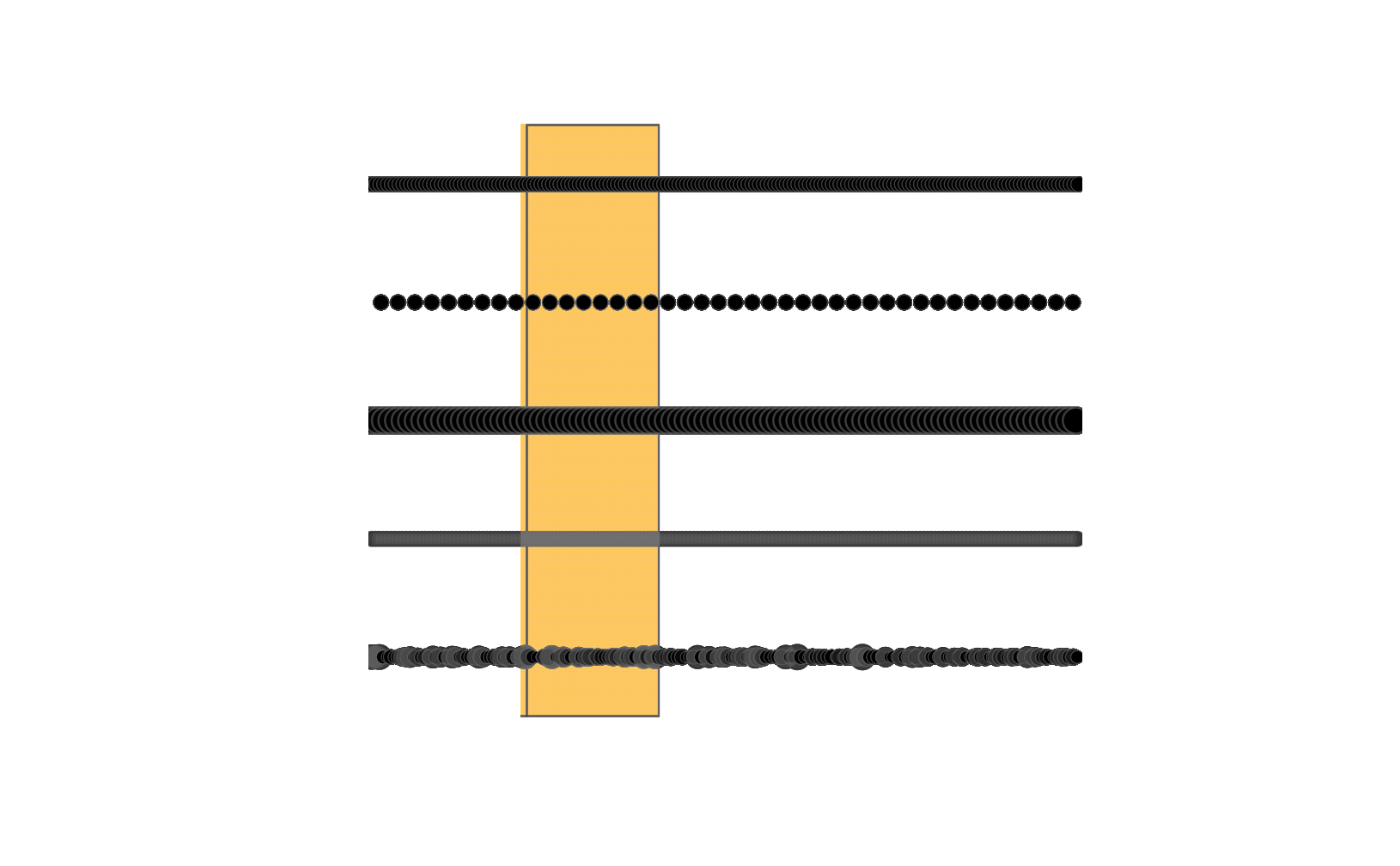
ex_file <- tempfile(fileext = ".png")
mypaint_device(ex_file)

plot.new()
plot.window(c(0, 10), c(0, 10))
rect(2, 0, 4, 10, col = "orange")
pen <- load_brush("classic/pen")
set_brush(pen)
abline(h = 9, lwd = 3)
set_brush(tweak_brush(pen, dabs_per_actual_radius = 0.5))
abline(h = 7, lwd = 3)
set_brush(tweak_brush(pen, radius_logarithmic = 1.5))
abline(h = 5, lwd = 3)
set_brush(tweak_brush(pen, opaque = 0.5))
abline(h = 3, lwd = 3)
set_brush(tweak_brush(pen, radius_by_random = 0.2))
abline(h = 1, lwd = 3)

dev.off()
#> agg_record_1d936db59147
#>                       2
img <- png::readPNG(ex_file)
grid::grid.raster(img)